Moodily
Activation
New users don't reach the first moment of value because the next step isn't obvious.
Customer Education Studio
We plan, script, record and edit the tutorials, guides and onboarding that help customers understand what you offer — and we keep them accurate when your product changes.
The adoption gap
New users don't reach the first moment of value because the next step isn't obvious.
Documentation exists, but few people watch a long webinar to learn one feature.
Customers use a fraction of what they pay for, and support answers the same questions again and again.
What we make
Task-based videos: one job, start to finish, in a few minutes.
The first-week path, in the order a new customer needs it.
Printable, skimmable PDFs and help-centre articles.
For training programmes, partner enablement or certifications.
One tutorial cut into short clips for in-app tips and social.
Adapted examples and language for a specific audience, scoped per project.
Planning a tutorial
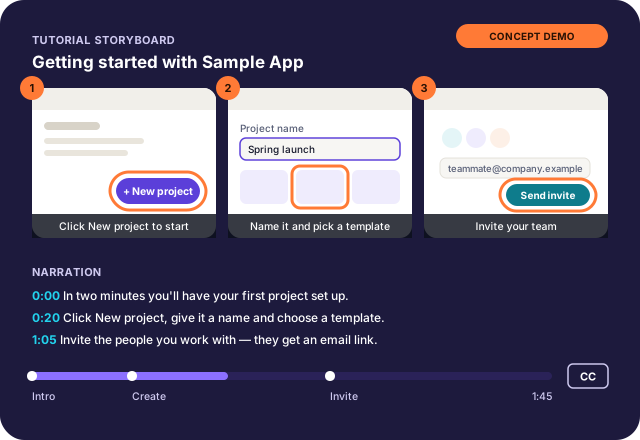
Software · onboarding tutorial (fictional app)
What it shows
How we produce
Where customers get stuck, from your support questions and team.
AI speeds up the first draft; a person writes the final version.
Each step is checked in a test or sandbox account before recording.
Nothing is recorded or published without your sign-off.
Services
From USD 499
Tutorials, onboarding videos, quick-start guides and knowledge assets that help customers understand and use what you offer.
Typical timeline: Confirmed in your written scope
USD 900
A small, complete set of learning assets for one product area or onboarding step.
Typical timeline: 10–15 working days after access and review times are agreed
From USD 499 / month
Ongoing upkeep of your profiles, pages and customer-education assets within a defined monthly scope.
Typical timeline: Monthly, starting from onboarding
Proof
Client work appears here only with the client's written permission. Where a business result wasn't measured, we say so.
Paid software review — screen demonstration, narration and editing
Software walkthrough + short cut-downs
Product tutorial
A test or sandbox account is ideal. We don't need production customer data, and we avoid showing real customer information on screen.
We check each step against the product before recording, and your subject-matter expert approves scripts at an agreed checkpoint. Nothing is published without your approval.
Yes, as a small follow-up project or within a Digital Care plan with a defined monthly scope.
Only with your written permission. Some deliverables can't be shared because of ownership or confidentiality, and that's fine.
We'll reply with a suggested scope and whether a first tutorial or a pack makes more sense.
Not sure where to start? A Digital Journey Audit reviews your current path from search to enquiry.